
Staying organized is not hard because you do not care. It is hard because life is full. Work deadlines, school schedules, family appointments, meal planning, and everyday tasks can pile up fast, and most of the time the “system” lives inside someone’s head. When that happens, missed events and last minute stress become normal.
That is why visible, shared tools matter. A smart display that sits where the family actually looks can reduce the mental load and make routines feel simpler. Apolosign builds products around this idea, especially its large touchscreen digital calendar and its portable smart screens designed for flexible entertainment and communication. Its own store positions the brand around three main categories: a digital family organizer, a portable smart screen TV, and a more playful digital photo frame experience.
In this guide, you will learn what Apolosign offers, what features stand out, who it is best for, and how to choose the right model. You will also get a clear difference chart so you can compare options quickly.
What is Apolosign and what does it sell?
Apolosign focuses on “smart screens for daily life.” The brand’s lineup highlights:
- A large touchscreen Digital Calendar built for family scheduling and home organization
- A 32 inch smart portable screen that supports apps and can move room to room
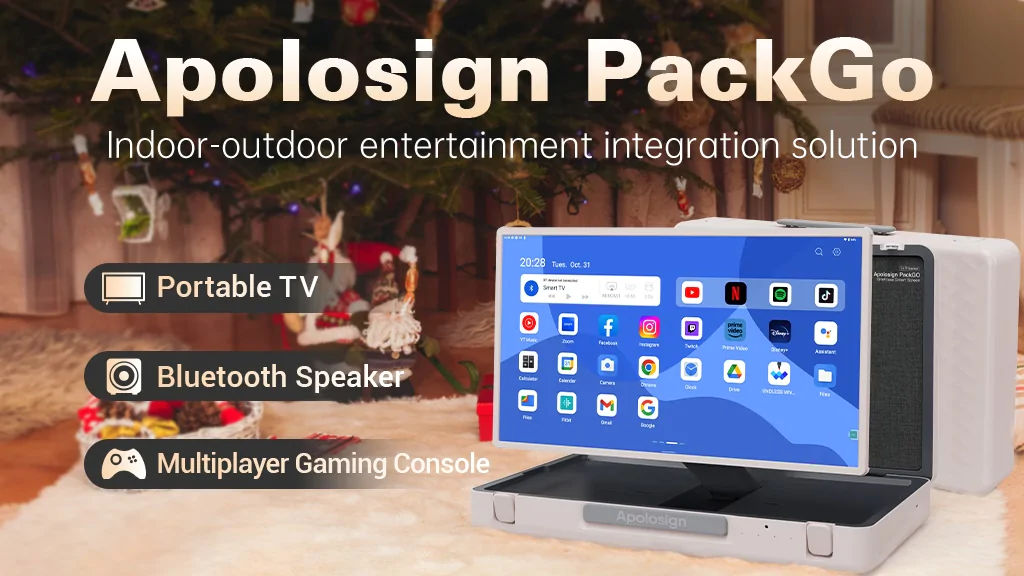
- A PackGo briefcase portable TV designed for travel, outdoor use, and parties
- Digital photo frame options, including a neon style frame on the brand’s store.
Apolosign also advertises customer friendly policies such as a 30 day risk free trial and a 1 year limited warranty on its site, which can be important when buying a premium household device.
Apolosign Digital Calendar: A shared family schedule that stays visible
A digital calendar is most powerful when it is easy for everyone to see and update. Many people already rely on digital calendars, but phone based calendars still create a problem: they are personal, not shared, and they are often buried inside notifications and apps.
Apolosign’s 21.5 inch Digital Calendar is designed to function as a shared home hub. Its product listing emphasizes auto syncing and a “family organizer” approach rather than a basic calendar screen.
Features that matter in real life
From Apolosign’s product page, the key features include:
- Calendar auto sync with Apple, Google, and Microsoft services (Apple, Google, Outlook, and more)
- Routines that turn chores into points and rewards
- Dashboard customization using Android widgets
- Meal planning, recipe organization, and shopping or grocery lists
- Google Photos display with “no subscription” messaging on the product page
- Voice control and Gemini AI chat support on the device page
- Google Home links for smart control of doorbells and cameras
There is also an official Apolosign app on the iOS App Store described as a way to manage events, chores, to do tasks, rewards, and meal plans.
Real world example: The “one parent remembers everything” problem
Picture a household with two parents working, one child with after school activities, and another child with tutoring. The schedule is manageable until changes happen: practice is moved, a doctor appointment shifts, or a school event is announced late. A visible calendar helps because:
- Everyone sees what is coming without asking
- Reminders are not locked inside one phone
- Chores and routines become consistent because progress is visible
That visibility is exactly what a wall style or counter style digital calendar aims to solve.
Apolosign 32 inch Smart Portable Screen: Entertainment, work, and calls that move with you
Apolosign’s 32 inch portable smart screen is positioned as a large touchscreen that can be moved around the house. The product listing highlights Full HD touchscreen viewing, mobility, and smart features like apps and a built in camera.
Notable features from the product listing
According to Apolosign’s product page, the portable screen includes:
- 32 inch Full HD touchscreen display.
- Wheels and an adjustable stand for moving between rooms .
- Android based software with Google Play mentioned on the listing
- An 8MP camera for video calls and communication use cases.
- Battery life messaging indicating portability.
Real world example: One screen, many jobs
This type of screen fits people who want flexibility, such as:
- Watching workouts in the living room, then moving the screen to the kitchen for cooking videos
- Setting up video calls for family, remote work, or virtual learning
- Using streaming apps without needing to mount another TV
If you want a “second screen” that is not stuck in one room, this category is designed for that.
Apolosign PackGo briefcase TV: A portable setup built for travel
The PackGo product page describes a 27 inch briefcase style portable smart screen designed to go with you. It highlights:
- 1080p touchscreen display
- 40W speakers
- 6 hour battery and 45W charging mentioned on the product listing.
This is a strong fit for outdoor gatherings, travel, RV use, tailgates, or anyone who wants a self contained entertainment setup that feels more “grab and go” than a rolling stand.
Difference chart: Which Apolosign option should you choose?
Here is a quick comparison of the three most commonly discussed Apolosign screen types.
| Feature | Apolosign Digital Calendar 21.5 | Apolosign 32 inch Portable Smart Screen | Apolosign PackGo 27 inch Briefcase TV |
|---|---|---|---|
| Best for | Family scheduling and routines | Flexible home entertainment and calls | Travel, parties, outdoor and on the go use |
| Screen style | Fixed home organizer screen | Rolling stand portable screen | Briefcase form factor portable screen |
| Key highlights | Sync, routines, lists, voice control, widgets | Touchscreen, apps, mobility, 8MP camera | 1080p touch, 40W speakers, 6 hour battery |
| Why it feels different | Reduces mental load through visibility | Turns one screen into many room experiences | Built for portability first |
One more helpful comparison: Subscription vs one time ownership
If you are shopping for a digital calendar, one common decision is whether to buy a device that locks features behind an ongoing subscription. Apolosign published a cost comparison article showing an example where a subscription calendar adds yearly fees over a five year period, while Apolosign positions its models as “no subscription” hardware ownership.
Even if you do not follow their exact math, the idea is useful: always check whether core family features (like rewards, chores, or sharing) require paid upgrades long term.
Conclusion: Is Apolosign worth it?
Apolosign is most worth considering if you want a screen that solves a daily problem, not just a screen that looks cool.
- Choose the Digital Calendar if your biggest pain is coordination, routines, and household planning.
- Choose the 32 inch portable smart screen if you want a moveable screen for streaming, calls, and flexible use around the home
- Choose the PackGo briefcase TV if portability is your top priority and you want a travel friendly entertainment setup.
If you are ready to simplify schedules, reduce last minute stress, or add a more flexible screen experience at home, Apolosign is a practical option to explore.